AWS Security Dashboard
A Next.js dashboard and .NET API that scan your AWS account for security gaps, IAM risks, Inspector findings, cost concentration, and tagging audits.
- Outcome
- One Auth0-gated place to see IAM risks, open exposure, Inspector findings, and Cost Explorer spend by project tag (FinOps view) without hopping consoles.
- Problem
- The AWS console answers “open this resource.” It fails at “how exposed are we right now?” across S3, EC2, RDS, IAM, Lambda, Inspector, and Cost Explorer.
- Decision
- Split a Next.js UI from a .NET scanning API so the browser never holds AWS credentials. The API walks the account with the SDK behind Auth0.
- Result
- Reviewers get misconfigs and stale credentials in one dashboard instead of a CIS toggle wall nobody looks at.
Metrics
AWS keys in browser
0
Surfaces in one review
7 domains
Cost Explorer
by project tag

- Stack
- .NET 10
- Next.js
- React
- TypeScript
- Auth0
- AWS SDK
- Tailwind CSS
- Started
Context
The AWS console is fine when you already know which resource to open. It is a poor answer to “how exposed are we right now?” across S3, EC2, RDS, IAM, Lambda, Inspector, and Cost Explorer in one place.
I wanted a posture view I would actually open in a review: misconfigs, stale credentials, and cost concentration against checks that matter, not a wall of unused CIS toggles.
Constraints
- No AWS keys in the browser. Ever.
- Prefer the default AWS credential chain (env, shared config, or IAM role) over a custom secret store for local and container deploys.
- Keep the UI and the scanner releasable on different cadences.
- Stay bilingual (EN/ES) without bolting a heavy i18n framework onto every view.
Architecture decision
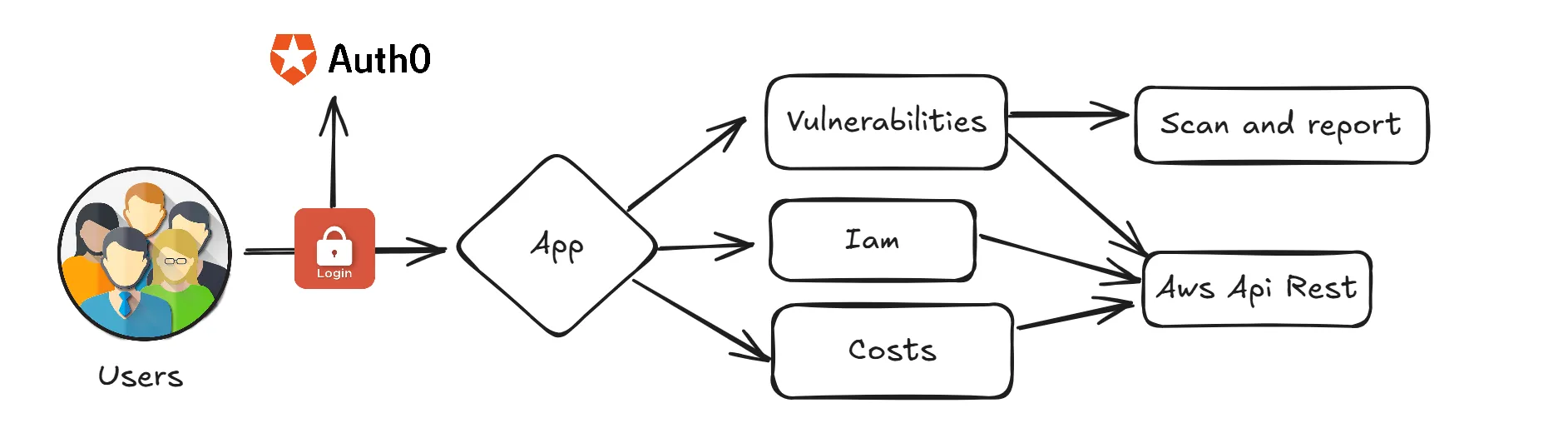
I split the product into two public repos. The diagram above is the trust path: Auth0 on the edge, Next.js for UI, .NET for scans.
| Piece | Repo | Role |
|---|---|---|
| App | Aws.Dashboard.App | Auth0-protected UI: dashboard, costs, IAM, vulnerabilities, security checks, audits |
| API | Aws.Dashboard.Api | REST backend: AWS SDK scans, layered architecture, Swagger |
Why not one Next.js app that talks to AWS from the server only? I wanted a clear API boundary I can call from other clients later, and a .NET stack that matches how I already ship backends. Why not Security Hub alone? Hub is great when it is already wired. This dashboard is the “open it and see” surface for accounts where I still need custom checks and cost-by-tag in the same session.
Frontend: Next.js 15 (App Router), TypeScript, Tailwind, Auth0, TanStack Query,
Recharts. Catch-all home/[[...section]] with keep-alive views, light/dark themes, and a
bilingual /guide.
API: .NET 10 in four projects (Aws.Api, Aws.Services, Aws.Repository,
Aws.Models). Regional endpoints take ?region=. IAM and Cost Explorer stay global.
Credentials follow the
AWS SDK default chain.
| Domain | What it checks |
|---|---|
| Summary | Regional scorecard aggregating counters from all scans |
| S3 | Public buckets, encryption status |
| EC2 | Open ports, unused security groups, unattached volumes, IMDSv1 |
| RDS | Open ports, unencrypted instances, backup retention |
| IAM | Access keys, MFA, risky policies, admin grants, cross-account roles, root account |
| Lambda | Publicly invocable functions |
| ELB | Internet-facing load balancers, unencrypted HTTP listeners |
| ECR | Public repository policies, scan-on-push disabled |
| ACM | Expiring and expired certificates |
| Inspector | Vulnerabilities for EC2, Lambda, and ECR |
| Audits | Untagged resources and resources by project tag |
| Cost | Costs grouped by project tag via Cost Explorer |
GET /api/v1/security/summary?region=us-east-1&days=30
GET /api/v1/iam/access-keys
GET /api/v1/ec2/open-ports?region=us-east-1
GET /api/v1/cost/by-project?startDate=2026-01-01&endDate=2026-01-31
Security / blast radius
Auth0 gates the UI. The browser never holds AWS credentials. The API walks the credential chain on the server and returns structured findings only.
Middleware caches the Auth0 JWT in a cookie so protected routes do not call getSession on
every navigation. Thresholds (public CIDRs, access key max age, RDS backup minimums,
Inspector page size, CORS origins) live in appsettings.json, not in the client bundle.
Blast radius if the API role is overprivileged: every scan domain becomes readable. Least privilege on that role is part of the deploy story, not an afterthought.
Ops
Docker and Azure Pipelines configs ship for container deploys to ECR/ACR. Point the API at credentials, configure Auth0 on the app, and you get a posture view on demand instead of a quarterly spreadsheet.
This pairs with AWS Account Alarms: the dashboard is pull (“what looks wrong right now?”), the Terraform module is push (“tell me when it happens”).